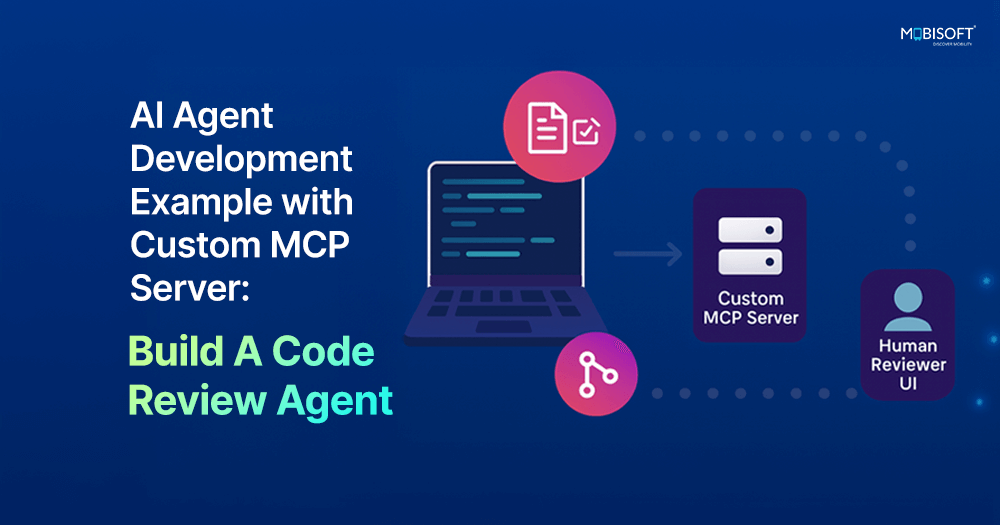
AI Agent Development Example with Custom MCP Server: Build A Code Review Agent – Part I
Using MCP servers can make your AI agents intelligent and more rooted in the context of the task. This ensures that the LLM model gets right context about your task so that it can produce results specific to your goals.
In this comprehensive guide, we'll demonstrate AI agent development by building a practical example: a code review agent that integrates with Claude Desktop using the Model Context Protocol (MCP). Through this hands-on MCP development tutorial, you'll learn how to create AI agents for software development that can automatically detect your project's programming language, load appropriate review checklists, and provide structured feedback.
By the end of this guide, you'll understand the fundamentals of building AI agents and have a fully functional code review tool that you can customize for your team's specific needs or adapt for entirely different use cases.
Explore more about MCP and its role in AI systems: Learn more about MCP and its role in AI systems here
What we will build:
A code review agent that works with Claude Desktop
Automatic technology detection for Python, JavaScript, Java, Go, Rust, and TypeScript
Customizable review checklists with security, quality, and performance checks
Pattern-based code analysis using regular expressions
Real-time progress tracking during reviews
Time required: 30-45 minutes
Skill level: Intermediate Python knowledge
Prerequisites:
Python 3.11 or higher installed
Claude Desktop application
Basic command line familiarity
Understanding AI Agent Development Through a Code Review Implementation
Before we dive in, let's clarify exactly how this code review system works:
How the Code Review Process Works in Our AI Agent
Our implementation uses static code analysis, not AI-based code review. Here's what happens:
Pattern Matching: Devs create a YAML checklist containing regex patterns based on specific requirements. The system used this checklist to check flag errors line by line (e.g., eval(, hardcoded passwords, console.log).
File Validation: Checks if required files exist (e.g., requirements.txt, package.json)
Static Analysis: No actual code execution - just text pattern matching
Discover more about AI solutions for businesses: Check out our AI services for businesses to explore custom AI solutions.
The AI Agent's Role: How Claude Orchestrates MCP Tools
Claude's role is limited to:
Natural Language Interface: You can ask "review my Python code" instead of calling command-line tools
Tool Orchestration: Claude decides which MCP server development tools to call based on your request
Result Presentation: Claude formats and explains the findings in conversational language
What This Means for AI Agent Development
Regex patterns do the actual code review you define in YAML files
Not AI-based: Claude doesn't analyze your code semantically or understand logic
Pattern-based: You define what to look for (like "find all eval() calls")
Customizable: You control exactly what gets checked by editing YAML checklists
Deterministic: Same code always produces the same results (no AI variability)
Why Building AI Agents with MCP This Way Is Effective ?
This hybrid approach gives you:
Control: You define the exact rules via YAML checklists
Speed: Pattern matching is fast, no AI inference needed for scanning
Consistency: Deterministic results every time
Extensibility: Easy to add new checks without AI training
Convenience: Natural language interface via Claude Desktop
Think of it as linting rules + Claude's conversational interface. You're essentially building an AI agent with MCP that runs as a customizable linter through natural conversation.
Read More: https://mobisoftinfotech.com/resources/blog/ai-development/ai-agent-development-custom-mcp-server-code-review
Using MCP servers can make your AI agents intelligent and more rooted in the context of the task. This ensures that the LLM model gets right context about your task so that it can produce results specific to your goals.
In this comprehensive guide, we'll demonstrate AI agent development by building a practical example: a code review agent that integrates with Claude Desktop using the Model Context Protocol (MCP). Through this hands-on MCP development tutorial, you'll learn how to create AI agents for software development that can automatically detect your project's programming language, load appropriate review checklists, and provide structured feedback.
By the end of this guide, you'll understand the fundamentals of building AI agents and have a fully functional code review tool that you can customize for your team's specific needs or adapt for entirely different use cases.
Explore more about MCP and its role in AI systems: Learn more about MCP and its role in AI systems here
What we will build:
A code review agent that works with Claude Desktop
Automatic technology detection for Python, JavaScript, Java, Go, Rust, and TypeScript
Customizable review checklists with security, quality, and performance checks
Pattern-based code analysis using regular expressions
Real-time progress tracking during reviews
Time required: 30-45 minutes
Skill level: Intermediate Python knowledge
Prerequisites:
Python 3.11 or higher installed
Claude Desktop application
Basic command line familiarity
Understanding AI Agent Development Through a Code Review Implementation
Before we dive in, let's clarify exactly how this code review system works:
How the Code Review Process Works in Our AI Agent
Our implementation uses static code analysis, not AI-based code review. Here's what happens:
Pattern Matching: Devs create a YAML checklist containing regex patterns based on specific requirements. The system used this checklist to check flag errors line by line (e.g., eval(, hardcoded passwords, console.log).
File Validation: Checks if required files exist (e.g., requirements.txt, package.json)
Static Analysis: No actual code execution - just text pattern matching
Discover more about AI solutions for businesses: Check out our AI services for businesses to explore custom AI solutions.
The AI Agent's Role: How Claude Orchestrates MCP Tools
Claude's role is limited to:
Natural Language Interface: You can ask "review my Python code" instead of calling command-line tools
Tool Orchestration: Claude decides which MCP server development tools to call based on your request
Result Presentation: Claude formats and explains the findings in conversational language
What This Means for AI Agent Development
Regex patterns do the actual code review you define in YAML files
Not AI-based: Claude doesn't analyze your code semantically or understand logic
Pattern-based: You define what to look for (like "find all eval() calls")
Customizable: You control exactly what gets checked by editing YAML checklists
Deterministic: Same code always produces the same results (no AI variability)
Why Building AI Agents with MCP This Way Is Effective ?
This hybrid approach gives you:
Control: You define the exact rules via YAML checklists
Speed: Pattern matching is fast, no AI inference needed for scanning
Consistency: Deterministic results every time
Extensibility: Easy to add new checks without AI training
Convenience: Natural language interface via Claude Desktop
Think of it as linting rules + Claude's conversational interface. You're essentially building an AI agent with MCP that runs as a customizable linter through natural conversation.
Read More: https://mobisoftinfotech.com/resources/blog/ai-development/ai-agent-development-custom-mcp-server-code-review
AI Agent Development Example with Custom MCP Server: Build A Code Review Agent – Part I
Using MCP servers can make your AI agents intelligent and more rooted in the context of the task. This ensures that the LLM model gets right context about your task so that it can produce results specific to your goals.
In this comprehensive guide, we'll demonstrate AI agent development by building a practical example: a code review agent that integrates with Claude Desktop using the Model Context Protocol (MCP). Through this hands-on MCP development tutorial, you'll learn how to create AI agents for software development that can automatically detect your project's programming language, load appropriate review checklists, and provide structured feedback.
By the end of this guide, you'll understand the fundamentals of building AI agents and have a fully functional code review tool that you can customize for your team's specific needs or adapt for entirely different use cases.
Explore more about MCP and its role in AI systems: Learn more about MCP and its role in AI systems here
What we will build:
A code review agent that works with Claude Desktop
Automatic technology detection for Python, JavaScript, Java, Go, Rust, and TypeScript
Customizable review checklists with security, quality, and performance checks
Pattern-based code analysis using regular expressions
Real-time progress tracking during reviews
Time required: 30-45 minutes
Skill level: Intermediate Python knowledge
Prerequisites:
Python 3.11 or higher installed
Claude Desktop application
Basic command line familiarity
Understanding AI Agent Development Through a Code Review Implementation
Before we dive in, let's clarify exactly how this code review system works:
How the Code Review Process Works in Our AI Agent
Our implementation uses static code analysis, not AI-based code review. Here's what happens:
Pattern Matching: Devs create a YAML checklist containing regex patterns based on specific requirements. The system used this checklist to check flag errors line by line (e.g., eval(, hardcoded passwords, console.log).
File Validation: Checks if required files exist (e.g., requirements.txt, package.json)
Static Analysis: No actual code execution - just text pattern matching
Discover more about AI solutions for businesses: Check out our AI services for businesses to explore custom AI solutions.
The AI Agent's Role: How Claude Orchestrates MCP Tools
Claude's role is limited to:
Natural Language Interface: You can ask "review my Python code" instead of calling command-line tools
Tool Orchestration: Claude decides which MCP server development tools to call based on your request
Result Presentation: Claude formats and explains the findings in conversational language
What This Means for AI Agent Development
Regex patterns do the actual code review you define in YAML files
Not AI-based: Claude doesn't analyze your code semantically or understand logic
Pattern-based: You define what to look for (like "find all eval() calls")
Customizable: You control exactly what gets checked by editing YAML checklists
Deterministic: Same code always produces the same results (no AI variability)
Why Building AI Agents with MCP This Way Is Effective ?
This hybrid approach gives you:
Control: You define the exact rules via YAML checklists
Speed: Pattern matching is fast, no AI inference needed for scanning
Consistency: Deterministic results every time
Extensibility: Easy to add new checks without AI training
Convenience: Natural language interface via Claude Desktop
Think of it as linting rules + Claude's conversational interface. You're essentially building an AI agent with MCP that runs as a customizable linter through natural conversation.
Read More: https://mobisoftinfotech.com/resources/blog/ai-development/ai-agent-development-custom-mcp-server-code-review
0 Commenti
0 condivisioni
763 Views
0 Anteprima

 English
 Arabic
 French
 Spanish
 Portuguese
 Deutsch
 Turkish
 Dutch
Dutch
 Russian
 Romaian
 Portuguese (Brazil)
 Greek
Greek